Imagine searching Google for “Best Digital Marketing Course in Mohali.”
You click on the first website.
Instead of answering your question, the page starts with:
“Founded in 2012, our institute has been serving students with excellence…”
You scroll.
Still no course details.
Still no fees.
Still no curriculum.
Still no placement information.
Within seconds, you hit the Back button and choose another result.
Now imagine the second website.
The headline immediately says:
Become a Job-Ready Digital Marketer in 6 Months
Below that, you instantly see:
- What you’ll learn
- Who the course is for
- Real student success stories
- Certifications
- Placement assistance
- Course duration
- Call-to-action
Without realizing it, you’ve already decided which website feels more trustworthy.
This simple example explains why website structure matters just as much as the information itself.
Many businesses believe SEO is only about keywords, backlinks, or publishing more content. While those factors play a role, they can’t compensate for a page that fails to address the visitor’s needs.
Google’s ranking systems are designed to reward content that genuinely helps people. That means your page should quickly answer the visitor’s question, provide original insights, demonstrate expertise, and guide them toward the next logical step instead of making them search for it themselves.
Whether you’re creating:
- A homepage
- A service page
- A product page
- A landing page
- A blog post
- An eCommerce category page
…the underlying formula remains remarkably similar.
This guide will show you exactly how to structure your content so that it is easy for users to read, easier for Google to understand, and more likely to convert visitors into customers.
🚀 Ready to Learn Digital Marketing?
Looking for the best Digital Marketing Course in Mohali? Learn SEO, Google Ads, Meta Ads, AI Marketing, and more through practical training, live projects, and placement support at Digital Discovery Institute.
Contact Now →The Core Formula Behind Every High-Performing Page
Before discussing headings, images, or SEO, it’s important to understand something even more fundamental.
People don’t read websites in order.
They scan.
Within the first few seconds, they subconsciously ask themselves questions like:
- Am I in the right place?
- Does this page understand my problem?
- Can I trust this business?
- Is this worth my time?
If your content answers those questions quickly, visitors continue reading.
If it doesn’t, they leave.
That’s why almost every successful web page follows the same psychological sequence:
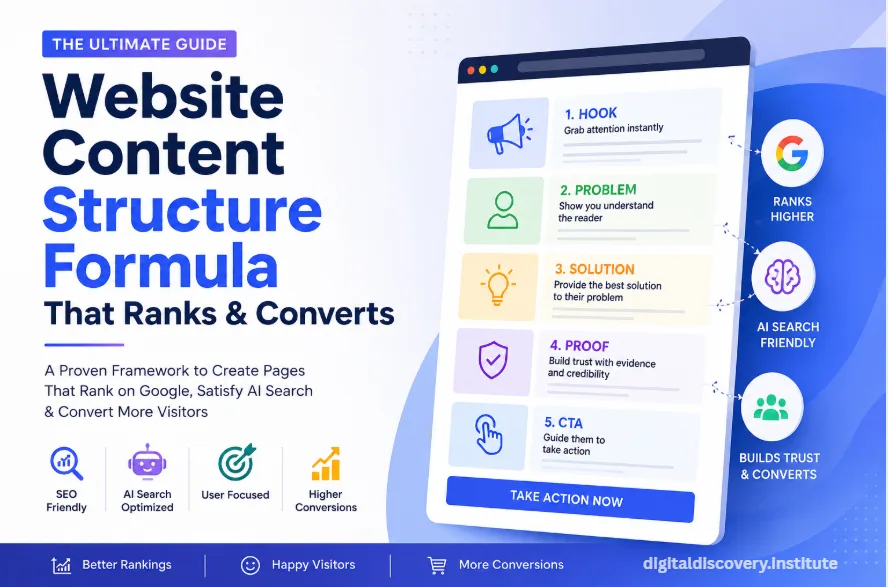
1. Hook – Capture Attention Immediately
The first job of your page isn’t to sell.
It’s to earn another five seconds of attention.
Your headline should immediately communicate value.
For example:
❌ Welcome to ABC Technologies
vs.
✅ Professional Roofing Services in Melbourne with a 20-Year Warranty
The second headline tells users exactly what they can expect.
The same principle applies to blog posts.
Instead of:
SEO Tips
Write:
25 SEO Tips That Increased Organic Traffic by 214% (With Real Examples)
Specificity builds curiosity.
Curiosity earns attention.
Attention creates engagement.
Real Example
Suppose someone searches:
“How to Learn SEO from Scratch.”
Which introduction would you read?
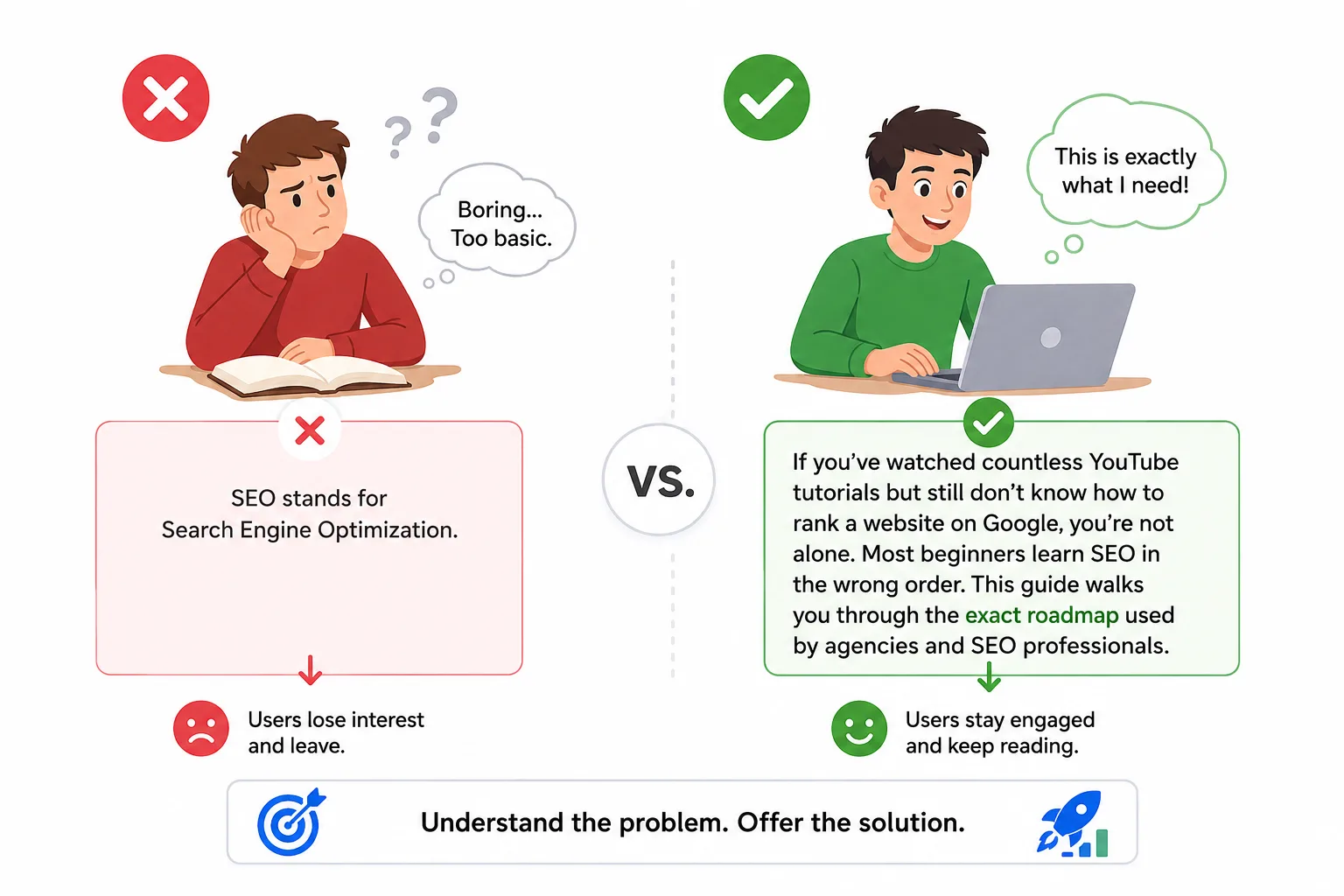
Version A:
SEO stands for Search Engine Optimization.
Version B:
If you’ve watched countless YouTube tutorials but still don’t know how to rank a website on Google, you’re not alone. Most beginners learn SEO in the wrong order. This guide walks you through the exact roadmap used by agencies and SEO professionals.
Most people naturally continue reading Version B because it acknowledges their problem before offering a solution.
2. Problem – Show That You Understand the Reader
Once you’ve captured attention, the next step is empathy.
Visitors want to feel understood.
Instead of jumping straight into explanations, demonstrate that you understand their challenge.
For example, if you’re selling a digital marketing course, don’t immediately list modules.
Instead, acknowledge the reader’s concerns:
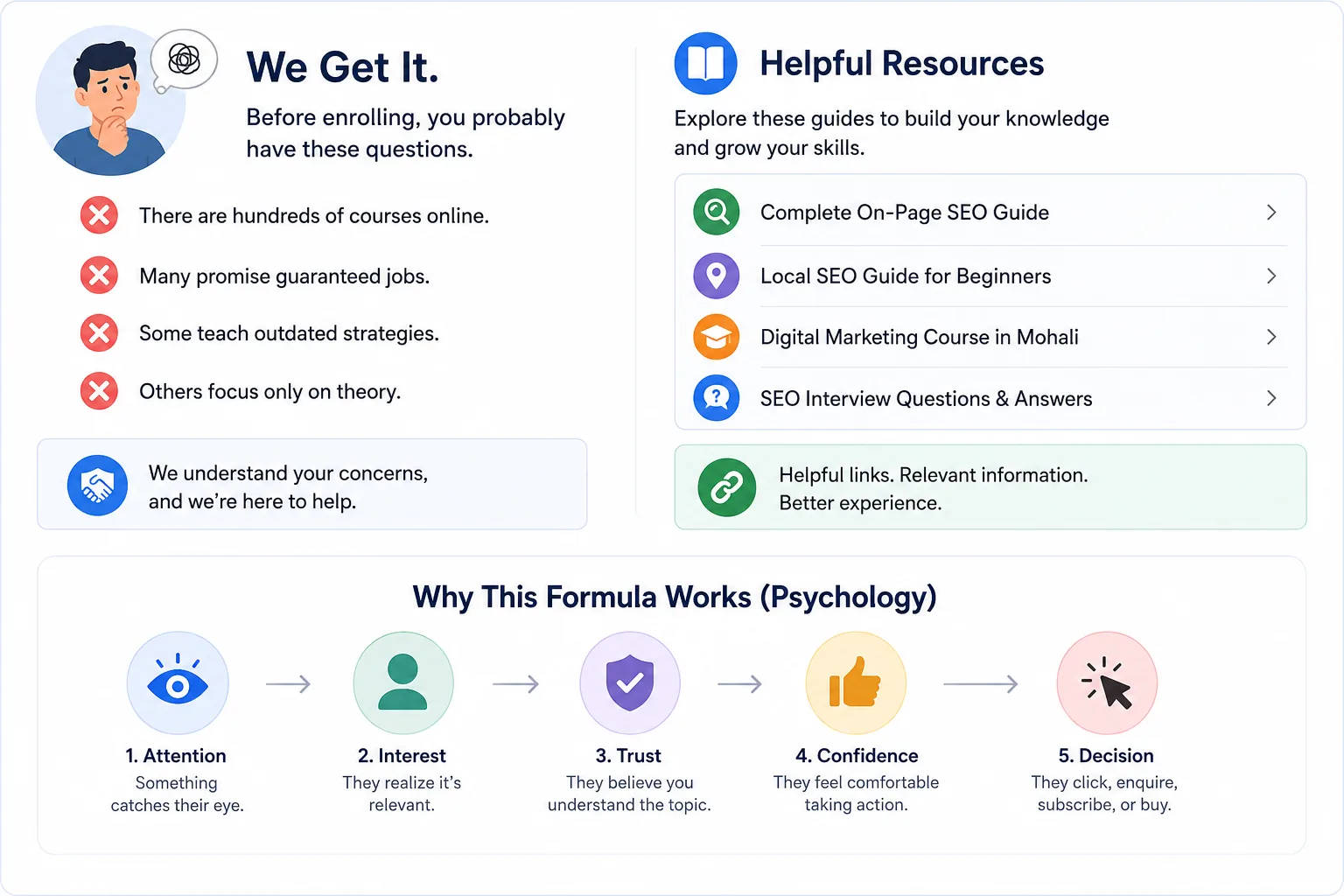
- There are hundreds of courses online.
- Many promise guaranteed jobs.
- Some teach outdated strategies.
- Others focus only on theory.
These are genuine concerns students face before enrolling.
By addressing them first, you create trust.
This is one reason Google’s people-first content guidance emphasizes satisfying the user’s purpose rather than simply repeating keywords. Content that clearly addresses the reader’s intent is more likely to provide a satisfying experience.
Internal Resource
If you’re planning to build an SEO-friendly website using this framework, start with our homepage to explore our training programs and digital marketing resources.
You may also find these guides useful as you build your content strategy:
- Complete On-Page SEO Guide
- Local SEO Guide for Beginners
- Digital Marketing Course in Mohali
- SEO Interview Questions & Answers
These pages naturally support readers who want to learn more about website optimization, which is exactly how effective internal linking should work: it helps users discover related information instead of interrupting their journey. Google similarly recommends using clear, contextual internal links and descriptive anchor text to improve navigation.
Why This Formula Works (Psychology)
People rarely make decisions based purely on information.
Instead, they move through a simple mental process:
- Attention – Something catches their eye.
- Interest – They realize it’s relevant.
- Trust – They believe you understand the topic.
- Confidence – They feel comfortable taking action.
- Decision – They click, enquire, subscribe, or buy.
Every high-converting webpage is designed to guide visitors through these stages naturally rather than expecting them to figure everything out on their own.
3. Explanation – Educate Before You Sell
Once your visitor feels understood, they’re far more willing to learn.
Your job is now to explain:
- Why the problem exists
- What causes it
- Why previous solutions may not have worked
- What the best approach looks like
Think of yourself as a consultant, not a salesperson.
For example, if you’re writing a page about Local SEO Services, don’t start by saying:
We offer Local SEO packages starting at ₹15,000.
Instead, explain:
Many local businesses struggle to appear in Google Maps because their Google Business Profile isn’t fully optimized, their website lacks location-specific content, and their business information is inconsistent across online directories. These issues reduce Google’s confidence in recommending the business to local searchers.
Now the visitor understands why they’re facing the problem—and they’re more receptive to your solution.
This aligns with Google’s guidance to create content that demonstrates genuine expertise and helps users accomplish their goals, rather than simply trying to rank for keywords.
Example: Roofing Service Website
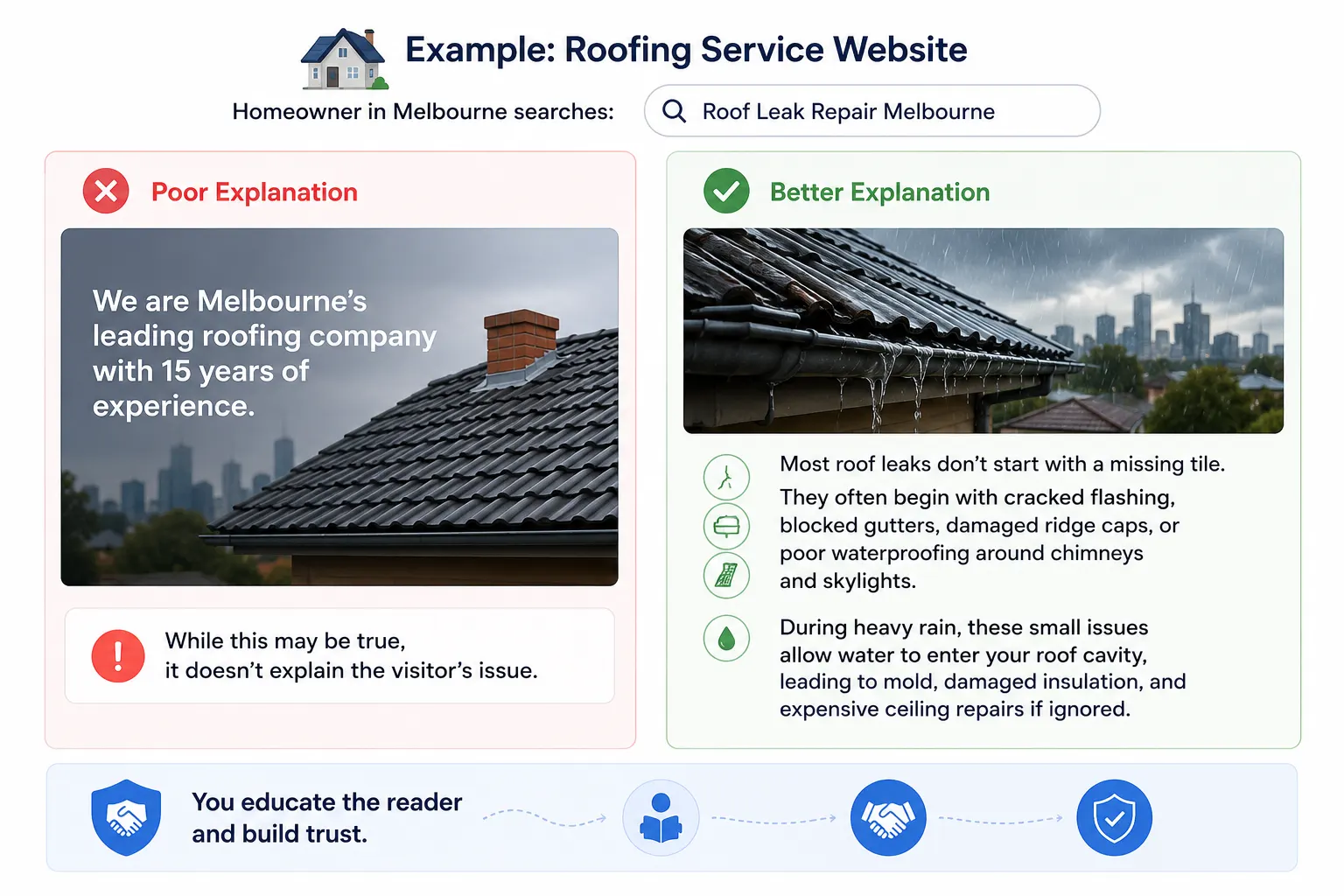
Imagine a homeowner in Melbourne searches:
“Roof Leak Repair Melbourne”
Poor Explanation
We are Melbourne’s leading roofing company with 15 years of experience.
While this may be true, it doesn’t explain the visitor’s issue.
Better Explanation
Most roof leaks don’t start with a missing tile. They often begin with cracked flashing, blocked gutters, damaged ridge caps, or poor waterproofing around chimneys and skylights. During heavy rain, these small issues allow water to enter your roof cavity, leading to mold, damaged insulation, and expensive ceiling repairs if ignored.
Now you’re educating the reader while building trust.
Case Study: Educational Website
One digital marketing institute redesigned its course page using this framework.
Before
- Generic introduction
- Long company history
- List of modules
- Contact form
Average time on page: 1 minute 12 seconds
After
The page answered:
- Is digital marketing a good career?
- Who is this course for?
- What salary can beginners expect?
- How much practical training is included?
- What tools will students learn?
- Student success stories
- Frequently asked questions
Result:
- Longer visitor engagement
- Higher enquiry rate
- Better quality leads
The biggest improvement wasn’t adding more keywords—it was answering the questions students were already asking.
4. Solution – Give the Visitor a Clear Next Step
Once you’ve explained the problem thoroughly, your visitor is ready for the solution.
This section should answer:
- What should they do?
- Why is your approach different?
- What results can they expect?
- What’s the next step?
A solution isn’t just a product or service.
It’s confidence.
For example:
Instead of writing:
Buy our SEO Course.
Write:
If you’re serious about building a career in SEO, start with structured learning instead of random YouTube videos. A guided curriculum helps you learn keyword research, on-page SEO, technical SEO, local SEO, and real client projects in the correct order, reducing months of trial and error.
See the difference?
The second version explains the value before presenting the offer.
Real Example: E-commerce Product Page
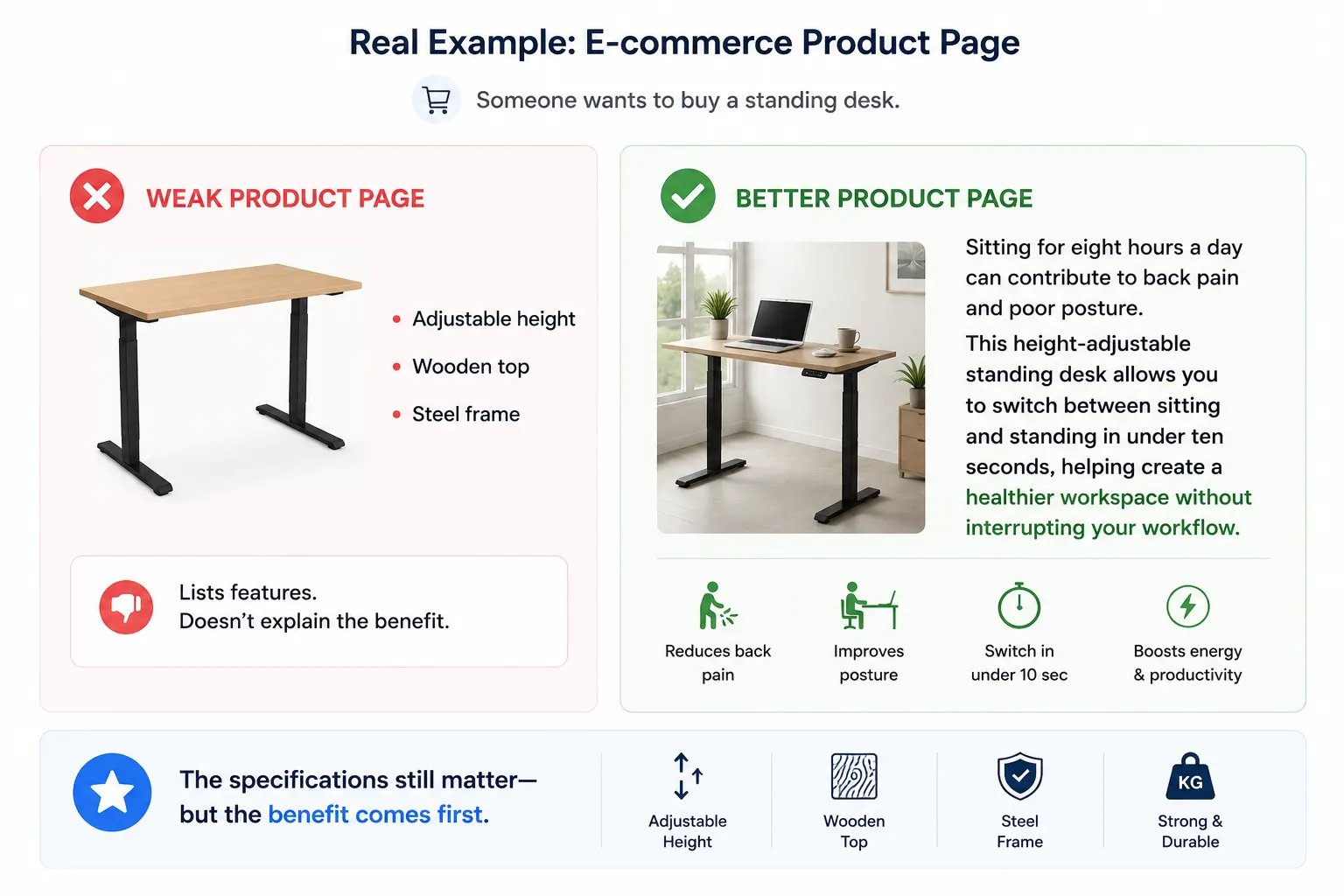
Imagine someone wants to buy a standing desk.
A weak product page says:
- Adjustable height
- Wooden top
- Steel frame
A better page says:
Sitting for eight hours a day can contribute to back pain and poor posture. This height-adjustable standing desk allows you to switch between sitting and standing in under ten seconds, helping create a healthier workspace without interrupting your workflow.
The specifications still matter but the benefit comes first.
The Universal 10-Part Website Content Formula
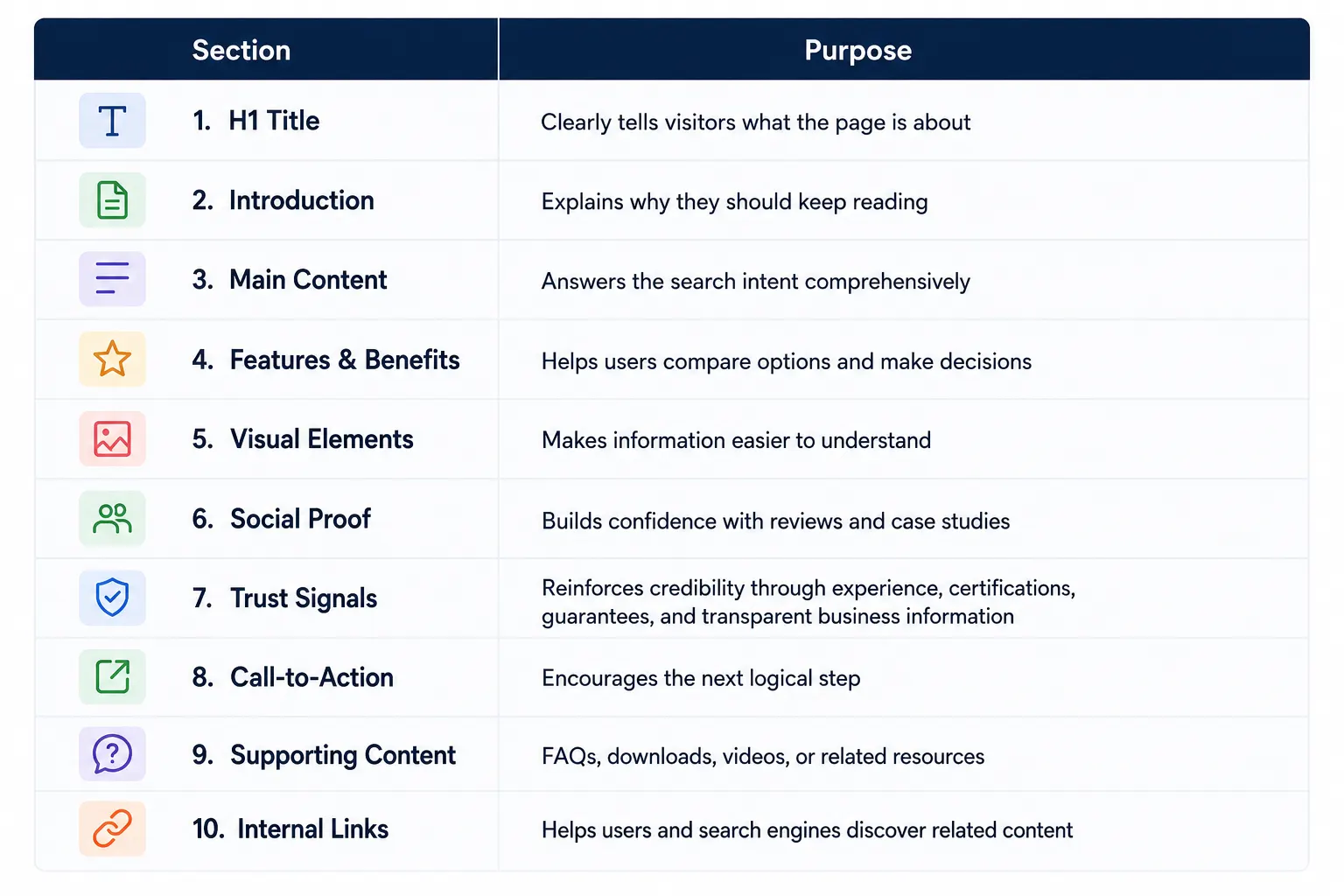
This structure doesn’t force every page to look identical.
Instead, it ensures every page answers the visitor’s key questions in the right order.
Google also recommends a logical site structure with descriptive internal links so users can easily discover related information.
Why Visual Hierarchy Matters
Imagine opening a webpage with:
- No headings
- No images
- Huge paragraphs
- No bullet points
- No white space
Even if the content is excellent, most visitors won’t read it.
Now compare that to a page that includes:
- Clear H2 headings
- Short paragraphs
- Icons
- Images
- Tables
- Highlight boxes
- Checklists
The second page feels easier to consume.
That’s because people scan before they read.
Your content should guide the reader’s eyes naturally.
Recommended Visual Elements
- Hero banner
- Process diagrams
- Infographics
- Before-and-after comparisons
- Statistics
- Charts
- Videos
- Screenshots
- Icons
- Testimonials
These aren’t decorative—they improve understanding.
Example: A High-Converting Service Page
Let’s compare two plumbing service pages.
Version A
Welcome to XYZ Plumbing.
We started our business in 2005…
Version B
Emergency Plumbing Services Available 24/7
- Licensed plumbers
- 30-minute response time
- Fixed upfront pricing
- 5-star customer reviews
- Same-day repairs
Which page feels more relevant?
Most users choose the second because it answers their immediate intent.
Expert Tip
Don’t confuse more content with better content.
A 3,000-word article that repeats the same ideas is less useful than a 1,800-word article filled with original examples, practical advice, and clear explanations.
Google’s guidance encourages content that adds original value and demonstrates real experience rather than simply rewriting what’s already available.
Why Visual Hierarchy Matters
Imagine opening a webpage with:
- No headings
- No images
- Huge paragraphs
- No bullet points
- No white space
Even if the content is excellent, most visitors won’t read it.
Now compare that to a page that includes:
- Clear H2 headings
- Short paragraphs
- Icons
- Images
- Tables
- Highlight boxes
- Checklists
The second page feels easier to consume.
That’s because people scan before they read.
Your content should guide the reader’s eyes naturally.
Recommended Visual Elements
- Hero banner
- Process diagrams
- Infographics
- Before-and-after comparisons
- Statistics
- Charts
- Videos
- Screenshots
- Icons
- Testimonials
These aren’t decorative—they improve understanding.
Example: A High-Converting Service Page
Let’s compare two plumbing service pages.
Version A
Welcome to XYZ Plumbing.
We started our business in 2005…
Version B
Emergency Plumbing Services Available 24/7
- Licensed plumbers
- 30-minute response time
- Fixed upfront pricing
- 5-star customer reviews
- Same-day repairs
Which page feels more relevant?
Most users choose the second because it answers their immediate intent.
Expert Tip
Don’t confuse more content with better content.
A 3,000-word article that repeats the same ideas is less useful than a 1,800-word article filled with original examples, practical advice, and clear explanations.
Google’s guidance encourages content that adds original value and demonstrates real experience rather than simply rewriting what’s already available.
Common Mistakes to Avoid
 Starting with company history
Writing for search engines instead of people
Keyword stuffing
Long paragraphs
No internal links
Weak headings
No examples
Generic stock images
No social proof
No clear CTA
Each of these creates friction for users, making it harder for them to find the information they need and take action.
Quick Content Audit Checklist
Before publishing any page, ask yourself:
- Does the headline clearly explain the topic?
- Does the introduction address the visitor’s problem?
- Is the content organized with logical headings?
- Have I included examples or case studies?
- Are there trust signals?
- Is there at least one relevant internal link?
- Have I answered the most common questions?
- Is the next step obvious?
If you answered “No” to any of these, improve the page before publishing.
Attract → Inform → Convince → Build Trust → Convert: The Content Journey That Wins Customers
Every visitor who lands on your website is on a journey. Some are just discovering your brand, while others are ready to make a purchase. Great content doesn’t force people to buy—it guides them naturally through each stage of the decision-making process.
Think of your website as a salesperson who is available 24/7. A good salesperson doesn’t start by asking for money. Instead, they understand the customer’s needs, answer questions, build confidence, and only then ask for the sale.
Here’s how that journey looks:
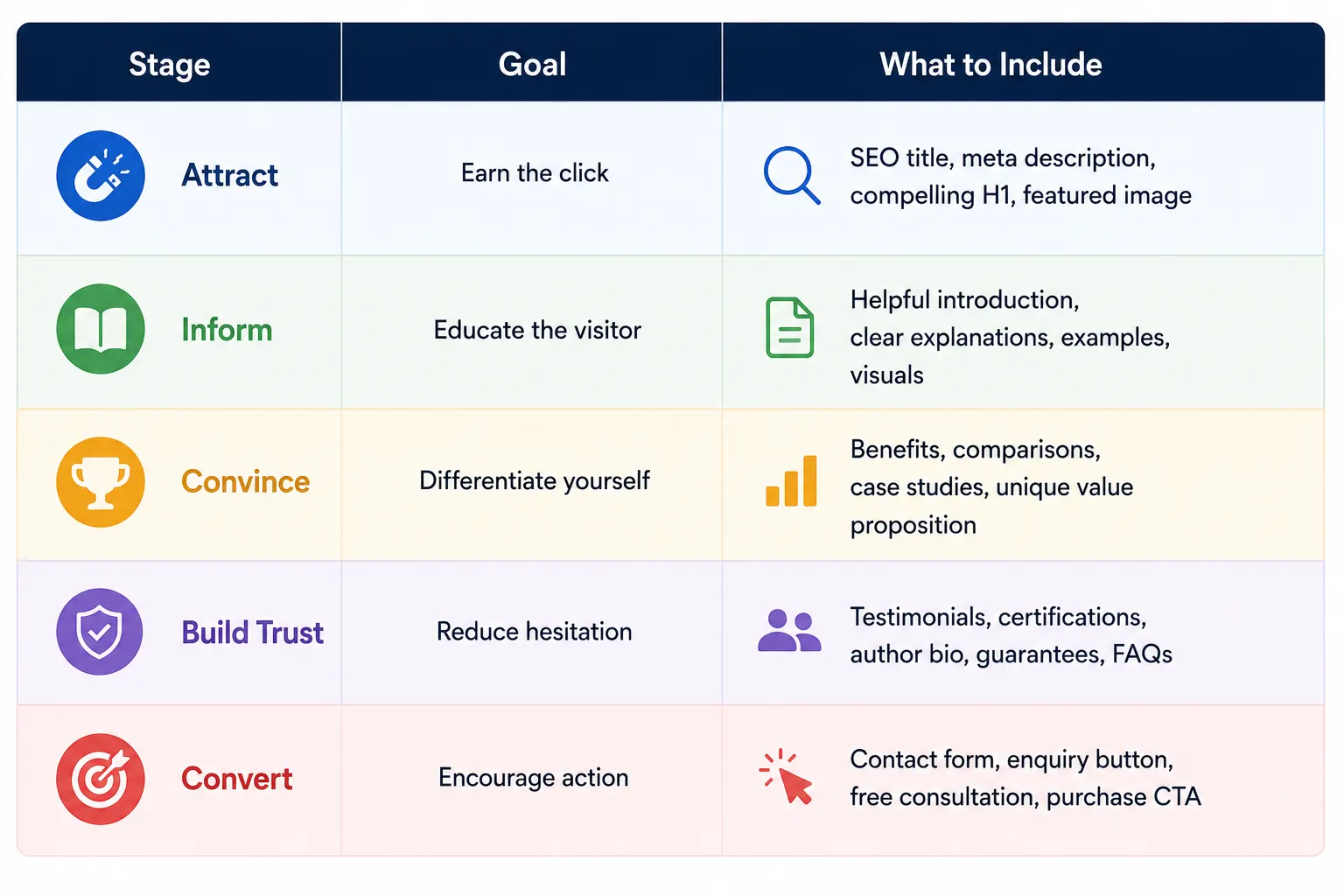
This framework aligns closely with Google’s guidance to create people-first content that satisfies user intent, demonstrates expertise, and provides a satisfying experience rather than simply targeting keywords.
How to Apply This Formula to Different Page Types
The beauty of this framework is that it works across almost every type of website. The difference lies in what you emphasize, not the overall structure.
1. Homepage
Your homepage should answer three questions within seconds:
- Who are you?
- What do you offer?
- Why should visitors trust you?
Suggested Structure:
- Hero section with clear value proposition
- Brief introduction
- Key services or products
- Why choose us
- Customer testimonials
- Featured case studies
- Latest blog posts
- Strong call-to-action
Internal Link Suggestions:
- Home → Digital Marketing Course
- Home → SEO Course
- Home → Blog
- Home → Contact Us
2. Service Pages
Service pages should focus on solving one specific problem.
For example, a Local SEO Service page might include:
- What is Local SEO?
- Why local businesses struggle to rank
- How your process works
- Case study
- Pricing or packages
- FAQs
- Contact form
Instead of saying “We provide Local SEO,” explain how Local SEO helps a restaurant appear in Google Maps, a dentist attract nearby patients, or a furniture store increase showroom visits.
3. Blog Posts
Blogs are designed to educate first and convert later.
A strong blog structure looks like this:
- H1
- Featured image
- Introduction
- Table of Contents
- Main H2 sections
- Examples
- Visuals
- Internal links
- FAQs
- Conclusion
- CTA
- Author bio
- Related articles
This layout improves readability and helps both users and search engines understand the hierarchy of your content. Google also recommends descriptive headings and contextual internal links that help readers find related information.
4. Product Pages
Many businesses make the mistake of treating product pages like brochures.
Instead, focus on helping customers make confident decisions.
A high-converting product page should include:
- Product name
- High-quality images
- Benefits before specifications
- Features
- Reviews
- FAQs
- Shipping information
- Return policy
- Warranty
- Related products
- Add-to-cart CTA
Remember, people buy outcomes—not specifications.
Real-World Example: A Blog Built Using This Formula
Let’s take the topic:
Top 10 Ways to Earn Money as an SEO Expert in 2026
A weak version would simply list ten methods.
A stronger version would:
- Explain why SEO is a growing career.
- Show salary ranges for freelancers, agencies, and consultants.
- Include mini case studies for each earning method.
- Compare the pros and cons of freelancing versus full-time jobs.
- Link to a beginner’s SEO learning roadmap.
- Recommend a structured SEO course for readers ready to build practical skills.
- End with a downloadable checklist or free consultation.
The result is a page that doesn’t just answer a question—it becomes a resource readers want to bookmark and share.
Internal Linking: Connecting Content With Purpose
Internal links are often treated as an afterthought, but they play an important role in improving user experience and helping search engines understand your site’s structure.
For example, if you’re writing about website content structure, it makes sense to link to:
- Homepage:
- Digital Marketing Course
- SEO Training Course
- Content Writing Course
- Complete On-Page SEO Guide
- Local SEO Guide
- Digital Marketing Course Fees in India
- SEO Interview Questions
These links should appear naturally where readers are likely to need additional information—not simply because you want to add more links. Google recommends using descriptive anchor text and ensuring important pages are linked from relevant content.
Content Checklist Before You Publish
Before you hit “Publish,” ask yourself:
- ✔ Does the title clearly communicate the page’s purpose?
- ✔ Does the introduction address the user’s intent?
- ✔ Is the content original and experience-based?
- ✔ Have I included practical examples?
- ✔ Are there visuals to support key concepts?
- ✔ Have I added relevant internal links?
- ✔ Are trust signals visible?
- ✔ Is there a clear next step for the reader?
- ✔ Have I answered common questions?
- ✔ Does the page leave readers feeling they no longer need to search elsewhere?
If the answer is “yes” to most of these questions, you’re much closer to creating the type of content Google’s systems are designed to reward.
Final Thoughts
The highest-performing webpages aren’t necessarily the longest or the most keyword-optimized—they’re the ones that make it easy for visitors to find exactly what they’re looking for.
Whether you’re writing a homepage, service page, product page, or blog post, the same principle applies:
- Capture attention.
- Understand the user’s problem.
- Explain the topic clearly.
- Offer a practical solution.
- Support your claims with examples and trust signals.
- Guide readers toward the next logical action.
When you combine this structure with original insights, real-world experience, helpful internal links, and a strong user experience, you create content that serves both your audience and search engines effectively. That’s the foundation of sustainable SEO and meaningful conversions.
Ready to put this framework into practice?
Explore our Marketing Course, SEO Training, and Content Writing Course to learn how to build websites and content strategies that attract qualified traffic, improve search visibility, and generate real business results.
If you’re a business owner, start by auditing your existing pages using the checklist from this guide. Small structural improvements such as clearer headings, better examples, stronger internal linking, and more visible trust signals—can make a significant difference to both user engagement and conversion rates.
Ready to build a successful career in digital marketing? Visit Digital Discovery Institute today and speak with our expert trainers.
Digital Discovery Institute, C-210A, Industrial Area, Phase 8B, Sahibzada Ajit Singh Nagar (Mohali), Punjab 140308
Frequently Asked Questions (FAQs)
Does every page need all ten content elements?
No. A blog post and a product page have different goals. Use the elements that support the page’s purpose while maintaining a clear structure.
How long should a blog post be?
There’s no ideal word count. Write enough to answer the user’s question completely. For most educational topics, 1,500–2,500 words provides enough space to cover examples, FAQs, and practical advice without becoming repetitive. Google explicitly states there is no preferred word count for ranking.
Is E-E-A-T a ranking factor?
E-E-A-T (Experience, Expertise, Authoritativeness, and Trustworthiness) is not a single ranking factor that you can “add” to a page. Instead, Google’s systems look for many signals that indicate trustworthy, helpful content. Demonstrating real experience, accurate information, clear authorship, and helpful resources contributes to those signals.
How many internal links should a page have?
There’s no fixed number. Add links where they genuinely help readers continue learning. A well-structured pillar article often includes several contextual internal links to relevant guides, services, and supporting resources.
Can this framework help AI Overviews and answer engines?
Yes. Clear headings, concise definitions, structured sections, FAQs, and comprehensive coverage make it easier for AI systems to understand and summarize your content. However, the primary goal should always be to help readers first rather than writing specifically for AI.